Long-term care insurance elimination-period day tracker (template)
Confused about which days count toward your parent’s long-term care insurance (LTCI) elimination period? This elimination-period day tracker template helps you line up dates, services, providers, and policy rules on one page so you can see – and show – which days appear to meet the contract’s criteria.
Get the free printable elimination-period day tracker ↓No account required.By Rachel Moore, Founder, Sagebeam · Published May 2026 · How we research and review our guides
One of the most confusing parts of long-term care insurance (LTCI) is the elimination period – the number of days that must pass, under certain conditions, before benefits start paying.
Families often assume that any day their parent needs help should count. Insurers only count days that match the contract’s specific definition of a “service day” or “elimination-period day.”
This article gives you a long term care insurance elimination period day tracker template you can use to line up:
- What your policy says should count,
- What actually happened on each day (services, providers, settings), and
- Your own view of whether that day appears to meet the criteria.
It is educational and is not legal or financial advice. Only the insurer (and, in some cases, a court) can decide which days count. Use this tracker to organize your side of the picture and to support clearer conversations with clinicians, advocates, or attorneys – especially if you are trying to understand how days during or after a hospital or rehab stay affect the elimination‑period timeline.
If you have not already done so, read:
- How to read your parent’s long-term care insurance policy in plain language
- How to avoid adding months to the long-term care insurance elimination period
- What documentation you need before filing a long-term care insurance home-care claim
- How to use care logs and doctor visits to support long-term care insurance claims
- Common reasons long-term care insurance home-care claims get delayed or denied
- What to track during a parent’s hospital stay
- How to help a parent transition home after a hospital stay
On this page:
- Quick answer – what an LTCI elimination-period tracker should capture
- How this tracker fits with your other LTCI tools
- Long-term care insurance elimination-period day tracker template (copy and adapt)
- Step-by-step: using the tracker for home-care days
- Tips for talking with the insurer about elimination-period days
Jump to template: LTCI elimination-period day tracker
Quick answer: what an LTCI elimination-period tracker should capture
A useful LTCI elimination-period day tracker should help you see, at a glance:
-
Which days you are counting, and why
- Date and day number in the elimination period (for example, Day 1, Day 2…).
-
What your policy says about elimination-period days
- A short summary of the policy’s rule (for example, “Day counts if covered LTC services are provided by a licensed home-health agency or in a nursing facility”).
-
What actually happened that day
- Whether your parent received covered services, which ADLs were helped, where care occurred, and who provided it.
-
Whether the day appears to meet the criteria
- Your own provisional “yes/no/unsure” based on the policy and what happened.
-
Notes and questions for follow-up
- Anything that might matter later, such as gaps in care, unusual circumstances, or questions you want to raise with the insurer.
The template below puts these elements into a reusable long term care insurance elimination period day tracker template you can print or keep in a shared workspace.
How this tracker fits with your other LTCI tools
Your elimination-period day tracker is one piece of your LTCI documentation system:
- The LTCI policy summary sheet tells you how long the elimination period is and what counts as a day.
- Your care logs and visit records show what actually happened on each day.
- This tracker lines those two things up in a structured way.
- Your call notes worksheet records what the insurer says about which days they will or will not count.
You can:
- Use the tracker to decide which days you believe should count before you call the insurer.
- Bring it (or a summary) to conversations with clinicians, advocates, or attorneys who are helping you interpret the policy.
- Refer back to it if there is a dispute about when your parent’s elimination period should have ended.
Long-term care insurance elimination-period day tracker template (copy and adapt)
You can copy and paste this elimination period tracking template for long term care insurance into your own document or spreadsheet, or into a caregiving workspace, and adapt columns as needed. For a spreadsheet, each row would be a day.
LONG-TERM CARE INSURANCE (LTCI) ELIMINATION-PERIOD DAY TRACKER

Parent / policyholder name: __________________________________________
Policy number: ______________________________________________________

Summary of policy rule for an elimination-period day
(from your policy / summary sheet – in plain language):
_____________________________________________________________________
_____________________________________________________________________

Example (replace with your own policy’s rule):
“A day counts if Mom receives at least 2 hours of covered home-health or
personal-care services from a licensed agency, or is in a nursing facility
receiving covered long-term care services.”

Elimination period length (number of days): __________________________

Are days (circle one): CONSECUTIVE / CUMULATIVE / UNSURE

TABLE – ONE ROW PER DAY

DATE | DAY # IN ELIMINATION PERIOD | SETTING (HOME / FACILITY / OTHER) | PROVIDER TYPE (AGENCY / INDEPENDENT / FAMILY / NURSE / OTHER) | SERVICES / ADLs PROVIDED (BRIEF) | HOURS OF COVERED CARE (IF RELEVANT) | APPEARS TO MEET POLICY CRITERIA? (YES / NO / UNSURE) | NOTES / QUESTIONS
-----|------------------------------|------------------------------------|----------------------------------------------------------------|----------------------------------|--------------------------------------|------------------------------------------------------|------------------
_____ | ________                   | ____________                       | ____________________________                                   | ________________________________ | ________                             | _________________________________                     | __________________
_____ | ________                   | ____________                       | ____________________________                                   | ________________________________ | ________                             | _________________________________                     | __________________
_____ | ________                   | ____________                       | ____________________________                                   | ________________________________ | ________                             | _________________________________                     | __________________
_____ | ________                   | ____________                       | ____________________________                                   | ________________________________ | ________                             | _________________________________                     | __________________
_____ | ________                   | ____________                       | ____________________________                                   | ________________________________ | ________                             | _________________________________                     | __________________
_____ | ________                   | ____________                       | ____________________________                                   | ________________________________ | ________                             | _________________________________                     | __________________
_____ | ________                   | ____________                       | ____________________________                                   | ________________________________ | ________                             | _________________________________                     | __________________
_____ | ________                   | ____________                       | ____________________________                                   | ________________________________ | ________                             | _________________________________                     | __________________
_____ | ________                   | ____________                       | ____________________________                                   | ________________________________ | ________                             | _________________________________                     | __________________
_____ | ________                   | ____________                       | ____________________________                                   | ________________________________ | ________                             | _________________________________                     | __________________
You can add or remove columns depending on what your policy emphasizes (for example, minimum hours, specific provider types, or particular settings).
Step-by-step: using the tracker for home-care days
To make this tracker actually helpful (and not just another spreadsheet to maintain):
-
Fill in the policy rule section first
- Using your policy-reading notes, write a one- or two-sentence summary of what an elimination-period day must include.
- Circle whether days are consecutive or cumulative, based on the contract.
-
Decide which days you will track
- For home-care claims, focus on days when your parent is receiving services that might meet the criteria – for example, days with covered home-health or personal-care services, not days with only brief check-ins or housekeeping.
-
Use your existing care logs and visit records
- Do not create a completely separate logging system if you can avoid it.
- Pull dates, providers, settings, hours, and ADLs from your most structured existing records and summarize them into this tracker.
-
Mark your best understanding of “meets criteria”
- In the “Appears to meet policy criteria?” column, mark YES / NO / UNSURE based on your reading of the policy.
- Use the notes column to flag why you are unsure (for example, “Agency caregiver but only did housekeeping tasks”).
-
Update periodically, not obsessively
- For cumulative elimination periods, you might update the tracker weekly.
- For consecutive periods, it may be more important to watch for gaps that could reset or slow the count.
No tracker is perfect. The goal is to make it much easier to answer, “Which days do we believe should count, and why?” when you or the insurer need to have that conversation.
Tips for talking with the insurer about elimination-period days
When you are ready to discuss elimination-period progress with the insurer:
-
Have your tracker and policy summary in front of you
- Be ready to cite specific dates and what happened on those days.
-
Ask clarifying questions about edge cases
- For example: “Would a day where Mom received 2 hours of hands-on help with bathing and dressing from a licensed agency caregiver count, even if no nurse visited?”
- Or: “If there is a hospital stay, how does that affect the elimination-period count?”
-
Use your YES / NO / UNSURE marks as a starting point, not a verdict
- You can say: “Based on our reading of the policy, we believe these 65 days meet the criteria. Can you walk us through which ones you agree with and which you see differently?”
-
Update the tracker with what you learn
- If the insurer clarifies that certain types of days do or do not count, adjust past entries and add a note so you remember for the future.
This template will not change the contract. But it can make your side of the conversation – and your internal decisions about planning and appeals – more organized, less reactive, and easier to explain to everyone involved.
For a plain-language overview of how LTCI elimination periods and benefit triggers work, AARP's guide to long-term care insurance is a useful reference. For free, unbiased help interpreting your parent's specific policy, your state's SHIP (State Health Insurance Assistance Program) offers no-cost insurance counseling.
Always rely on the actual policy language and qualified professional advice when deciding how to use this tracker in formal claims, appeals, or legal processes.
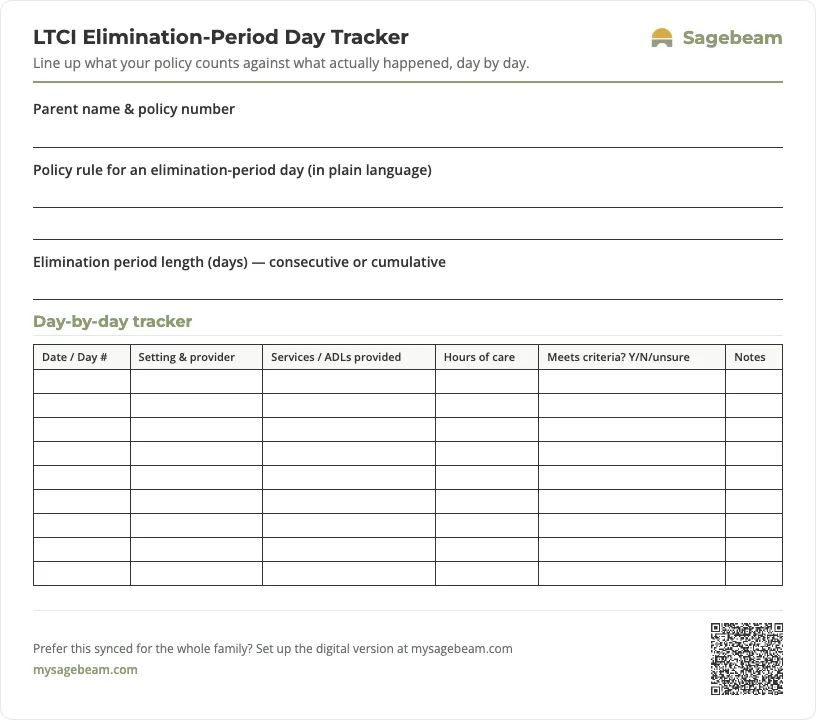
Print your elimination-period day tracker
A ready-to-use one-page sheet for tracking elimination-period days. Print it and fill it in by hand, or keep the same tracker digitally so the whole family can see the count.
 Sagebeam
| Date / Day # | Setting & provider | Services / ADLs provided | Hours of care | Meets criteria? Y/N/unsure | Notes |
|---|---|---|---|---|---|
- How LTCI, Medicaid, and private pay fit together for home care
- How to read your parent’s long-term care insurance policy in plain language
- Long-term care insurance policy and benefits summary sheet (template)
- What documentation you need before filing a long-term care insurance home-care claim
You don't need more tabs. You need one place to run your parent's care.
By signing up, you agree to the Terms and Privacy Policy.