Medicaid caregiver time and service records template – compliance-first timesheet
If you’re a paid family caregiver through Medicaid, your time and service records are more than a log – they’re payroll and compliance. This template shows exactly what to capture on each visit so your hours match program rules and you’re not scrambling at reassessment or audit time.
Get the free printable time & service record ↓No account required.By Rachel Moore, Founder, Sagebeam · Published April 2026 · How we research and review our guides
Part of: Getting paid as a family caregiver through Medicaid – full guide
When you’re a paid family caregiver through Medicaid, your time and service records are not just a log for your own memory. They are your Medicaid caregiver timesheet — what your fiscal intermediary and state program use to decide:
- Which hours will be paid,
- Whether those hours match your parent’s approved care plan, and
- How solid your documentation looks if there’s ever an audit or a reassessment that changes hours.
For many families, this part feels murky: you may get a timesheet form from a fiscal intermediary, an EVV app to clock in and out, or both — but little context about what “good” documentation looks like.
This article gives you:
- A quick checklist of what most Medicaid time and service records need to contain,
- A copy‑and‑adapt Medicaid caregiver timesheet template you can use in non‑EVV programs or as your own backup record, and
- Practical tips to avoid the small documentation mistakes that cause frustration later.
If you’re still deciding whether Medicaid paid family caregiving is even right for your family, start with:
- Can I get paid to be my parent’s caregiver through Medicaid? – short discovery filter.
- Getting paid as a family caregiver through Medicaid – full guide to how self‑directed programs work.
Once you know the path is open, this template helps you keep your hours and services straight.
On this page:
- Quick answer – what your Medicaid time and service records should include
- How this fits with EVV, daily logs, and shift reports
- Medicaid caregiver time and service records template (copy and adapt)
- Step‑by‑step: using this template without drowning in paperwork
- Common mistakes to avoid on Medicaid timesheets
- How this supports reassessments and appeals
Jump to template: Medicaid caregiver time and service records template
This article is educational and is not legal, financial, or benefits advice. Rules for programs like Medicaid and long-term care insurance vary by state and by plan and change over time. For your parent's specific situation, check with the program directly or a qualified professional — an elder-law attorney, a benefits counselor, or your state's Medicaid office.
Quick answer: what your Medicaid time and service records should include
Every state and program has its own quirks, but a solid Medicaid caregiver timesheet template almost always includes:
- Member and caregiver information
- Parent’s full name and Medicaid ID (or other member ID your program uses).
- Caregiver name and role (family caregiver).
- Date and time details
- Date of service.
- Start time and end time for each visit or shift.
- Total hours (often rounded based on program rules).
- Service type or task category
- Brief description or checkboxes for what you did during that time — e.g. help with bathing, dressing, meals, toileting, mobility, supervision, housekeeping related to care.
- Location
- Where the service took place (home, community, other allowed settings) if your program expects that field.
- Attestation and signatures
- A short statement that the hours and services listed are accurate.
- Caregiver signature and date.
- Member or authorized representative signature and date, when required.
Your fiscal intermediary or state program may require additional items (service codes, program names, etc.). Use the template below as a base, then add any extra lines they specify.
How this fits with EVV, daily logs, and shift reports
If you are in an EVV program, the EVV app is usually the official record of when and where you worked. This template can still help you:
- Keep your own backup record of hours and tasks in case of EVV glitches,
- Show what you actually did during those hours (services), and
- Tie your time and service records to your care log and reassessment preparation.
If you are not in an EVV program, this template (or a similar one from your fiscal intermediary) is often your primary timesheet.
It sits alongside:
- Caregiver daily log template for families – how your parent was doing and what changed.
- Home caregiver shift report template – handoffs between caregivers.
- Medicaid care log template for paid family caregivers – detailed notes on what care was provided and how long it took.
- Medicaid reassessment preparation checklist – pulling everything together for the visit where hours can change.
Think of it this way:
- Time and service records: “When was I there, and what covered help did I provide?”
- Care logs and reassessment prep: “What does my parent actually need, and how is that changing over time?”
You need both.
Medicaid caregiver time and service records template (copy and adapt)
You can copy and paste this template into your own document, spreadsheet, or caregiving workspace, or print it for your binder. Before using it, check it against any sample timesheets from your fiscal intermediary (FI) or program so you can add any required phrases or codes. If your FI requires you to use their exact form, treat this version as a working draft or personal backup, not a replacement for their official timesheet.
MEDICAID CAREGIVER TIME AND SERVICE RECORD

Program name (if applicable): ____________________________________________
Fiscal intermediary (FI) (if applicable): _________________________________

Member name: _________________________________
Medicaid / member ID: _________________________

Caregiver name: _______________________________
Relationship to member: _______________________ (e.g. daughter, son, niece)

Service period (week or month): From ________________ to ________________

INSTRUCTIONS:
- Use one row per visit or shift.
- Follow your program’s rules about rounding and how often timesheets are submitted.
- Make sure totals match what you clock in/out in any EVV system, if used.

DATE  | START TIME | END TIME | TOTAL HOURS | SERVICE TYPE(S) / TASKS PERFORMED | LOCATION (HOME / COMMUNITY / OTHER) | NOTES
------|------------|----------|------------|------------------------------------|--------------------------------------|------
______|____________|__________|____________|____________________________________|______________________________________|______
______|____________|__________|____________|____________________________________|______________________________________|______
______|____________|__________|____________|____________________________________|______________________________________|______
______|____________|__________|____________|____________________________________|______________________________________|______
______|____________|__________|____________|____________________________________|______________________________________|______
______|____________|__________|____________|____________________________________|______________________________________|______
______|____________|__________|____________|____________________________________|______________________________________|______
______|____________|__________|____________|____________________________________|______________________________________|______

SUMMARY FOR THIS PERIOD

Total hours this period: __________

Notes about changes, issues, or exceptions (missed visits, hospital stays, etc.):
______________________________________________________________________________
______________________________________________________________________________

ATTESTATION

I certify that the information above is true and complete to the best of my
knowledge. The hours and services listed reflect care actually provided during
the dates and times shown, in accordance with the member’s approved care plan.

Caregiver signature: ___________________________  Date: __________________

Member / authorized representative name (print): __________________________

Member / authorized representative signature (if required): _______________

Date: __________________
You can adapt this template into a spreadsheet if you prefer automatic totals, or keep it in a binder and add one page per pay period.
Step‑by‑step: using this template without drowning in paperwork
To keep this manageable, decide ahead of time:
- When you’ll fill it out
- At the end of each visit (especially if visits are short), or
- Once a day, summarizing all visits that day while your memory is fresh.
- Where it lives
- In a “Medicaid timesheets” section of your caregiver binder, or
- In a shared digital workspace you already use for caregiving.
- Who checks totals
- One person (often you, the main caregiver) should own making sure the hours on your timesheets match what’s in EVV and what the FI expects for the pay period.
Example:
- You clock in and out with the EVV app at your parent’s home.
- Each evening, you spend five minutes filling out the time and service record for that day, using the notes field to capture anything unusual (hospital visit, extra travel time, missed shift).
- At the end of the week, you total your hours and compare them to what the EVV system shows before you sign and submit.
The aim is a light rhythm you can stick with, not a second job of paperwork.
Common mistakes to avoid on Medicaid timesheets
Programs vary, but families and FIs often report similar issues that cause delays or denials:
-
Missing dates or times.
Leaving start or end times blank, or forgetting dates, makes it hard to verify hours. -
Totals that don’t match EVV or the care plan.
If you’re in an EVV program, the hours on your time and service records should match what the EVV system shows for the same period. If they don’t, add a brief note explaining why (for example, hospital stay, system outage). -
Vague or empty service descriptions.
Writing “caregiving” in every row doesn’t show how time lines up with covered services. Short, specific phrases like “bathing and dressing,” “meal prep and feeding,” or “mobility and toileting support” are more useful. -
No signatures or dates.
Many programs will not process timesheets without the caregiver signature, and some require the member or authorized representative as well. -
Sending timesheets late or in the wrong cycle.
Submitting outside the expected weekly or bi‑weekly rhythm can delay pay. Ask your FI or program contact exactly when they expect records and what period each sheet should cover.
If you are unsure about any of these, ask your FI or program contact directly: “Can you walk me through what a correct timesheet looks like for this program?”
How this supports reassessments and appeals
Time and service records are primarily about when you worked and what covered tasks you did, but they also support the bigger picture:
- When assessors review whether your parent’s hours are appropriate, they may look at patterns in how many hours you’re using and what kinds of help are needed.
- If hours are ever reduced and you need to appeal, clear time and service records plus a strong care log and reassessment preparation checklist make it easier to show what care is really required.
For that bigger picture, pair this template with:
- Medicaid care log template for paid family caregivers – what happened during each visit.
- Medicaid reassessment preparation checklist – how to bring everything together for the reassessment visit.
Together, those pieces help you accurately represent reality so your parent’s care plan matches what they truly need.
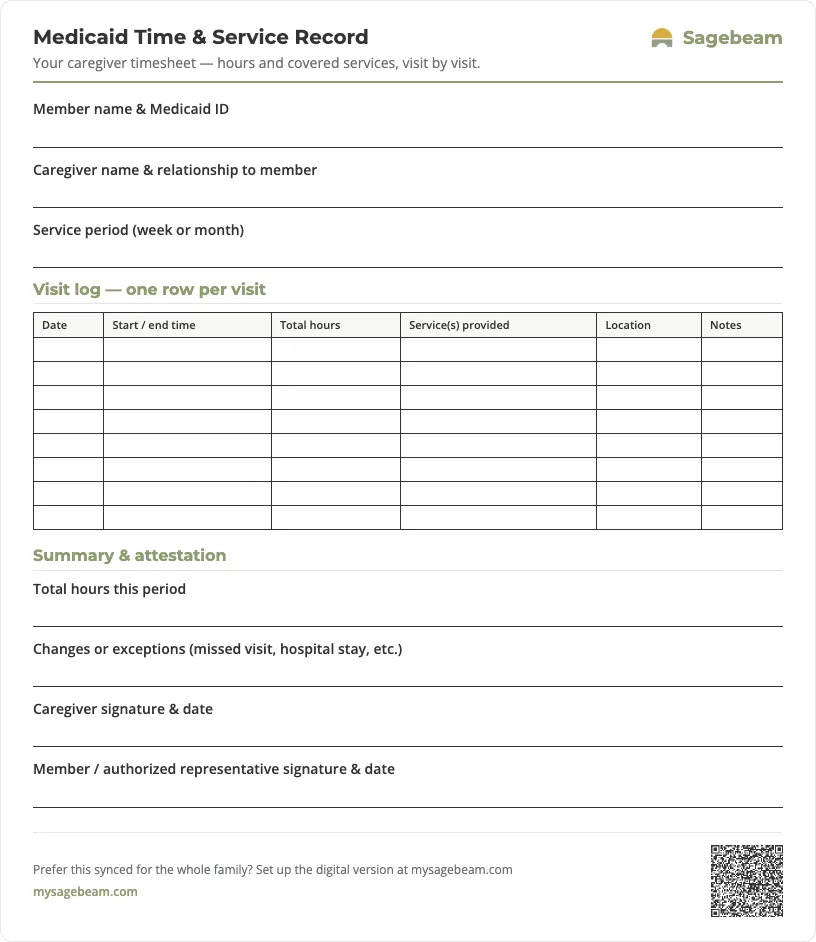
Print your time & service record
A ready-to-use one-page timesheet. Print it and fill it in by hand, or keep the same record digitally so hours and services are always up to date.
 Sagebeam
| Date | Start / end time | Total hours | Service(s) provided | Location | Notes |
|---|---|---|---|---|---|
- Can I get paid to be my parent’s caregiver through Medicaid? Eligibility checklist
- Medicaid care log template for paid family caregivers – show what care really takes
- Medicaid reassessment preparation checklist – show what your parent really needs
You don't need more tabs. You need one place to run your parent's care.
By signing up, you agree to the Terms and Privacy Policy.
Sources and further reading
- Electronic Visit Verification (EVV) – Medicaid.gov – explains federal EVV requirements for personal care and home health services.
- Self-Directed Personal Assistant Services 1915(j) (Medicaid.gov) – describes how states can let participants direct personal assistance services, including hiring relatives and expectations around documentation.