Weekly caregiver summary template for families (copy & use)
Use this weekly caregiver summary template to recap how your parent is doing each week – changes, wins, and worries – in one page you can share with siblings an…
Get the free printable weekly caregiver summary ↓No account required.By Rachel Moore, Founder, Sagebeam · Published April 2026 · How we research and review our guides
Part of: Care coordination for aging parents – simple system
When you’re caring for an aging parent, a lot can change in a week:
- New aches, stumbles, or stronger days.
- Medication tweaks and specialist visits.
- Small safety issues that feel minor in the moment, but add up.
- The very real question: “Is this getting better, worse, or just different?”
If updates live in scattered texts and quick conversations, it’s hard for siblings and doctors to see the bigger picture. You remember intense moments, but not the slow trends. That’s where a weekly caregiver summary helps.
This guide gives you:
- Who this is for: the primary caregiver or sibling who coordinates updates.
- A simple weekly caregiver summary template you can copy today.
- Clear examples for what to include (and what to skip).
- Ways to adapt it for families only, hired caregivers, or long-distance siblings.
- Tips on what to watch for over time and how to use summaries in appointments.
It fits into the broader system in our care coordination hub and pairs well with:
- Caregiver daily log template for families – day-to-day detail.
- How to structure daily and weekly check‑ins with a home caregiver – the cadence that turns raw notes into patterns.
- How to organize caregiving tasks and appointments for a parent (with weekly checklist) – forward-looking task planning.
- How to share caregiving updates with siblings – where updates live and who sees them.
- Medicaid reassessment preparation checklist – how to turn your logs and weekly summaries into concrete examples for Medicaid home care reassessments.
Think of the daily log as the raw notes for each day, the weekly caregiver summary as the story of the week, and the weekly checklist as the plan for next week. Here we zoom in specifically on the weekly recap: a backward-looking summary of what actually happened this week.
This article is educational and reflects general caregiving experience, not professional advice for your family's specific situation. For medical, legal, or financial questions, follow the guidance of your parent's care team and the qualified professionals who know their situation.
Quick answer: what a weekly caregiver summary template should include
A practical weekly caregiver summary template for families – the kind of weekly caregiver report template doctors and siblings can actually use – includes:
- Header
- Week of (dates covered)
- Who is writing the summary
- Who provides care (family, paid caregivers, both)
- This week in one glance
- 3–5 bullets on how this week compared to last week
- Health and function changes
- Mobility, falls or near-falls, sleep, pain, confusion, or mood shifts
- Medications and medical care
- Changes in meds, side effects, appointments, new instructions
- Daily life and safety
- Meals, hydration, bathroom, home safety issues, notable incidents
- What we’re watching next week
- Specific things to keep an eye on; questions for the doctor
- Requests / decisions for family
- Help needed, decisions that are coming up, escalation items
You can keep most weeks to one page or less. The goal is not perfection; it’s a consistent, calm snapshot that helps you and your parent’s “care circle” see trends.
In the next sections, we’ll walk through how to:
- Decide who writes and reads the weekly summary.
- Pick where it lives so you’re not chasing screenshots.
- Use the template and adapt it to your situation.
- Avoid common traps that make summaries noisy or overwhelming.
Step 1: Decide who writes and reads the weekly summary
Before you touch any template, get clear on roles:
- Primary writer. One person owns pulling the week together, even if others add notes.
- Contributors. Anyone who provides hands-on care can contribute – siblings, hired caregivers, neighbors.
- Audience. Who should see the summary every week? Common audiences:
- Siblings and close family.
- A trusted friend who helps coordinate.
- Occasionally, a doctor or care manager (often via a portal message or printed copy).
For many families, the pattern looks like:
- During the week: People jot quick notes in a daily log or shared workspace.
- Once a week: The primary writer reviews those notes and creates a one-page summary.
- After writing: The summary is shared in a consistent place (e.g., a shared note, email thread, or caregiving app), and key points are flagged for doctors or future decisions.
Write this down in 1–2 sentences at the top of your template so expectations are clear. For example:
“Weekly summary written by Alex (primary caregiver) each Sunday, based on notes from siblings and the home caregiver. Shared with the three siblings in our shared folder.”
Having a named owner makes the habit much more likely to stick.
Step 2: Pick one home for your weekly summaries
Weekly summaries only work if people know where to find them.
Choose one primary home:
- A shared digital note or folder (e.g., Google Docs, Notes, Notion, or your caregiving workspace).
- A care coordination app you already use.
- A paper binder section labeled “Weekly summaries,” if most of the care happens in one home and you later scan or photograph pages for siblings.
Whichever you pick, write it into the template:
“Weekly summaries live in:
Smith Family Care – Weekly Summariesfolder. New file each week namedYYYY-MM-DD_weekly-summary.”
You can still paste a short version into group text threads, but the full, dated version should live in that one home. That way, when you’re preparing for a doctor’s appointment or a family meeting, you’re not stitching together screenshots.
Step 3: Weekly caregiver summary template (copy and adapt)
You can copy and paste this template into your own document or binder section. Adjust headings and examples to fit your parent’s situation.
WEEKLY CAREGIVER SUMMARY

Week of: ____________________________
Dates covered: ______________________
Date written: _______________________
Summary written by: _________________
Caregivers involved this week: _________________________________
Optional notes from caregivers (if any): _______________________

1. This week in one glance
- Overall compared to last week (better / worse / about the same):
  ________________________________________________
- 3–5 key bullets about how the week went:
  - _____________________________________________
  - _____________________________________________
  - _____________________________________________

2. Health and function changes
- Mobility, balance, or falls / near-falls:
  ________________________________________________
- Energy, sleep, or stamina:
  ________________________________________________
- Mood, memory, or confusion:
  ________________________________________________
- Pain, breathing, or other symptoms:
  ________________________________________________

3. Medications and medical care
- Medication changes (dose, timing, new meds, stopped meds):
  ________________________________________________
- Noticed side effects or concerns:
  ________________________________________________
- Appointments this week (doctor, PT, nurse, etc.):
  ________________________________________________
- New instructions we were given:
  ________________________________________________

4. Daily life and safety
- Eating and drinking:
  ________________________________________________
- Bathroom / continence:
  ________________________________________________
- Home safety issues (stairs, stove, wandering, driving, etc.):
  ________________________________________________
- Help needed with daily tasks (bathing, dressing, bills, etc.):
  ________________________________________________

5. What we’re watching next week
- Specific symptoms or changes to watch:
  ________________________________________________
- Follow-ups or questions for the doctor:
  ________________________________________________
- Tasks we need to complete (forms, equipment, home changes):
  ________________________________________________

6. Requests and decisions for our family
- Help needed (time, tasks, visits, calls):
  ________________________________________________
- Decisions coming up (living situation, finances, driving, etc.):
  ________________________________________________
- Anything that feels urgent or worrying:
  ________________________________________________
You don’t have to fill in every line every week. Some weeks will be quiet and short; others will be longer because a lot changed. The structure helps you notice patterns without rewriting the format each time.
Step 4: Examples for different family situations
The same template works across many caregiving setups. Here are ways to adapt it.
If siblings live far away
When most siblings are long-distance, the weekly summary becomes the main way they understand what’s happening.
- Emphasize how this week compares to last week (“walking shorter distances,” “more confused in evenings,” “energy better in the mornings”).
- In “Requests and decisions,” be explicit about:
- What you need from them (calls to insurance, help arranging equipment, research).
- What you’re not asking for right now (e.g., no big decisions yet, just monitoring).
- Link to or reference your sibling update system so people know where to ask follow-up questions.
You might add a line under the header:
“This summary is the primary update for siblings who live out of town. Reply in our shared note if you have questions or concerns.”
If you work with hired caregivers
If you have home caregivers or aides, you can use the weekly summary to bridge their notes with the family view.
- Ask caregivers to record details in a daily log or shift notes.
- Use the summary to translate those notes into:
- Patterns (“three near-falls getting out of bed this week”).
- Questions (“do we need PT to reassess transfers?”).
- Requests (“can we adjust the care plan for mornings?”).
- In “Daily life and safety,” include anything caregivers repeatedly flag:
- “Needs more time in the bathroom; rushing leads to near-misses.”
- “More unsteady walking in the evenings.”
You can also decide whether caregivers see the weekly summary itself. Some families print it and keep it in a binder so everyone can skim last week before a shift.
If your parent is still fairly independent
In earlier stages, you might feel silly writing a “weekly report.” The key is to keep it light but consistent.
- Focus on subtle changes: walking speed, social engagement, how tiring errands are.
- Use a shorter version of the template:
- “This week in one glance”
- “Health and function changes”
- “What we’re watching next week”
- Note anything that might matter later, even if it’s small now:
- “Needed more help with bills this week.”
- “Got turned around driving to a familiar place.”
These early summaries become invaluable when you’re trying to remember when something started.
Step 5: How to use weekly summaries with doctors and planning
Weekly summaries aren’t just for siblings – they’re a powerful tool when you’re talking to professionals.
When you have an upcoming appointment:
- Skim the last 4–6 weeks of summaries.
- Highlight or mark:
- Patterns (e.g., “more falls in evenings,” “weight loss over 2 months”).
- Worries (“more confused after medication change”).
- Concrete examples (“needed help with stairs 4 days this week; independently last month”).
- Bring a printed copy of the latest summary or paste key points into the patient portal message.
Guides on preparing for visits, like UCSF Health’s overview of communicating with your doctor and the National Institute on Aging’s tips on taking someone to the doctor, emphasize coming in with organized notes and specific questions — your weekly caregiver summaries make that much easier.
Instead of saying:
“She’s been a little off lately.”
You can say:
“Over the last four weeks, Mom has had three near-falls getting out of bed, seems more confused after dinner, and has been eating about half her usual portions. Here are a few examples.”
That kind of detail makes it much easier for a doctor to adjust medications, order the right tests, or refer you to support like PT or OT.
Weekly summaries also feed into bigger planning moments, like:
- Updating your caregiver binder.
- Preparing for family meetings about living transitions or safety.
- Filling out other templates, like a caregiver handoff checklist when a hospital stay or rehab is involved.
- Creating a reusable medical history summary for new doctors so you’re not rewriting your parent’s story for every new provider.
Common mistakes (and how to avoid them)
As you start using weekly summaries, watch out for these pitfalls:
-
Turning the summary into a diary.
If you’re writing paragraphs about each day, stop and ask: “What will matter in a month?” Summaries should be condensed, not exhaustive. -
Hiding how hard it is.
It’s tempting to downplay struggles so you don’t worry siblings or seem like you’re complaining. But then no one understands the workload. Use the “Requests and decisions” section to name what’s hard and suggest specific ways others can help. -
Only writing summaries during crises.
Weekly summaries are most powerful when they show slow change. Try to keep the rhythm even in quiet weeks so you can see when things start to shift. -
Letting the template boss you around.
If certain sections never apply, cross them out. If you always wish there were a place for “caregiver notes” or “what went well,” add it. The template should feel like a useful tool, not homework. -
Keeping summaries where no one can find them.
Make sure every family member knows where summaries live and how to access past weeks. Consider a quick reminder like: “New summary posted every Sunday evening in our shared folder.”
Adapting the template over time
Your parent’s needs – and your caregiving setup – will change. Plan to revisit the template every few months:
- If weeks are too quiet, shorten the template so it doesn’t feel like overkill.
- If weeks are very busy, add structure for:
- Multiple caregivers or agencies.
- Separate sections for daytime vs. overnight.
- “Incidents this week” that point to a more detailed incident report.
- If you start working closely with a specific doctor or clinic, ask:
- “What would you like us to track week to week?”
- “Is there a format that’s easiest for you to skim?”
You can also connect your weekly summary with other tools:
- The daily log template for more granular notes.
- A rotating schedule or task checklist for planning next week’s work, not just recapping this one.
Over time, your weekly summaries become a quiet backbone of your parent’s care story – a way to remember where you’ve been, see where things are heading, and bring the right people into the loop at the right time.
Frequently Asked Questions
What’s the difference between a weekly caregiver summary and a daily log?
A daily caregiver log captures what happens during each day – meals, medications, visitors, mood shifts, and small incidents – often in a running list of notes. A weekly caregiver summary zooms out and turns those raw notes into patterns and decisions: what changed compared to last week, what you’re watching next week, and what help or decisions are coming up. Many families use the daily log as input and the weekly caregiver summary template as the one-page story of the week.
Should I share weekly caregiver summaries with my parent’s doctor?
You don’t have to share every weekly caregiver report template with the care team, but they can be very helpful when something is changing. Before an appointment, you can pull out 2–3 weeks of key patterns and examples from your summaries and either bring a printed copy or paste bullet points into a portal message. Keep sibling dynamics and personal feelings in your private notes, and share the clear, factual parts that help the doctor understand what daily life actually looks like.
How long should a weekly caregiver summary take to write?
Most families do well with a weekly caregiver summary that takes 10–15 minutes to write and fits on one page or less. If it’s taking an hour or spilling onto multiple pages every week, your template is doing too much – trim it down and focus on changes, patterns, and next steps. The aim is a steady, sustainable rhythm you can maintain even during busy or stressful weeks.
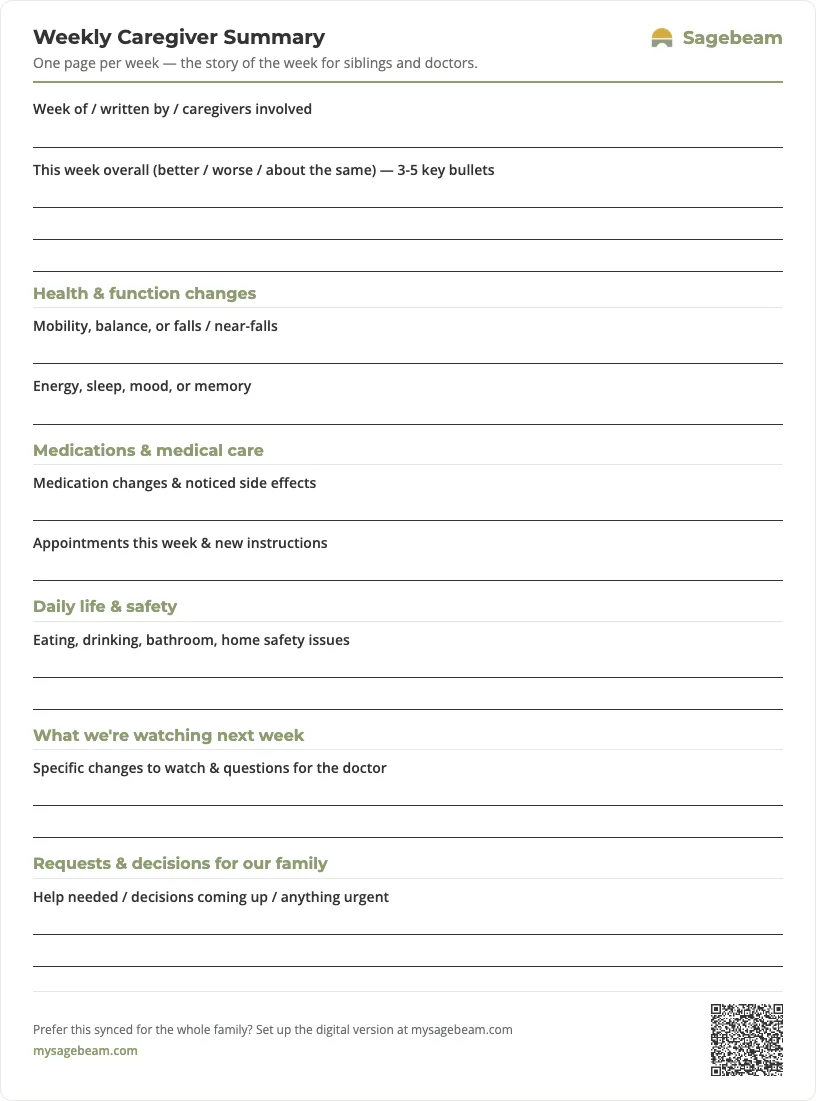
Print your weekly caregiver summary
A ready-to-use one-page sheet. Print it and fill it in by hand each week, or keep the same summary digitally so the whole family stays in sync.
 Sagebeam
- Tube feeding log sheet for families (printable G-tube and PEG record)
- Foley catheter output log and supply tracker (printable for families)
- Bowel movement and toileting log for elderly care (printable chart)
- Non-weight-bearing recovery support roster for families
You don't need more tabs. You need one place to run your parent's care.
By signing up, you agree to the Terms and Privacy Policy.
Related templates
- Caregiver daily log template for families – more granular day‑to‑day notes that feed into your weekly recap.
- Caregiver incident report template – a structured way to document falls and sudden changes you’ll reference in your summary.
- Medical history summary template for aging parents – a one‑page history you can share with new doctors and care facilities.